
Release 2026.10.15
Vertical and square, one steady bar, runs that outlive their window
13 new16 improved7 fixed
What changed · 7 scenes · 1:15
0:00 / 1:15
01 / 07Format
Vertical and square projects
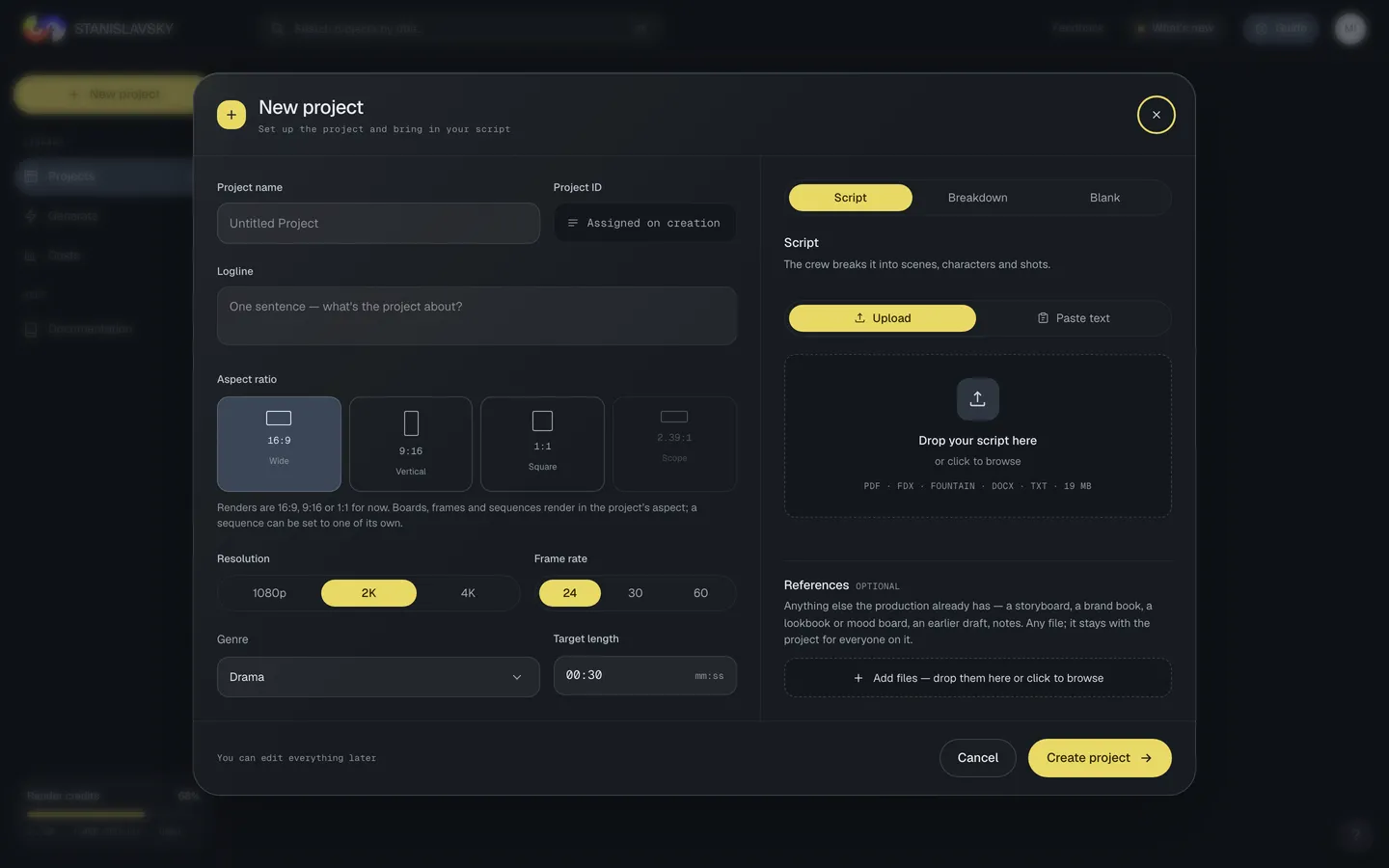
Choose Vertical or Square when you start a project: storyboards, frames, clips and the Program monitor all come out in that frame.
2026.10.15Oct 15, 2026ReleaseOct 15, 2026
Vertical and square, one steady bar, runs that outlive their window
Projects can be vertical or square; the studio bar is one line that never moves, windows grow out of what you clicked, and what waits for you glows; closing a window no longer stops what it was making — Generating now shows every run with its Cancel; the chat opens on one round table; the Shot generator says who is rendering and makes up to four takes in one press; the art department follows the DoP and keeps its references; the Producer's and the Director's pages can be written by hand; and any take can be deleted, with ⌘Z to bring it back.
NewFormat9:16 and 1:1 projects. Choose Vertical or Square when you start a project: storyboards, final frames, clips, the Program monitor, the hover cards and the cut's XML all come out in that frame, and a model that cannot make it exactly uses the closest it can and says so.See it
NewProjectsStart from a script, a breakdown, or nothing. The new-project dialog has Script, Breakdown and Blank tabs — the production's own sheets with the screenplay optional beside them, or an empty project to fill in later — and a References slot for anything else the production has: a storyboard, a brand book, a lookbook. They stay with the project, listed in its settings.See it
ImprovedProjectsBack from Cast your crew returns to the dialog on the same project, filled in as you left it; Continue saves into it. Each seat marks one persona Recommended — the one it starts on — and DoPs say MULTI-SHOT or SINGLE SHOT.
NewChatThe round table. The chat opens on one room with everyone on the project and the crew; people talk freely, and an agent answers only when named — @name, or @crew for the whole crew. Talk to one person or agent in their own conversation. The Chat button's dot says someone is waiting, red when it is you they named.
ImprovedChatAn answer's working folds away. The model, tokens, cache and cost behind each agent answer sit under Details.
ImprovedStudioWindows move like a camera. A window grows out of the block you clicked and goes back into it; the studio dims behind it; a new frame develops in.
?cinema=0 switches the motion off for your browser.ImprovedBreakdownA breakdown that stops says why, and goes on. Show progress stays on the Director's card and in First steps after a reload; a stopped breakdown opens on the stage and the reason, with Resume from that stage or Start over…. The line through the stages fills as the crew reads, the times read as reading time, and Live output turns until its first words.
NewDirectorWrite over the crew's reading. The Producer's script info — logline, synopsis, format, genre, tone, controlling idea — and the Director's structure, virtual edit and briefs can be rewritten by hand: the chip beside a line says Set by hand, keeps every earlier version, and a new run of the crew leaves your words in place and offers its own beside them.See it
ImprovedDesignRender is back on every prop card — it switches the prop to Design and renders it. The timeline keeps one lane for the set, Set & space, and Storyboard opens on its sheets, with the panel plan second.
ImprovedRenderThe prompt stays on screen. On a short window the prompt and its buttons hold to the bottom edge instead of sliding under it, and the prompt's height has a grip you can see — the corner of the box, or the edge above it.
ImprovedStudioOne steady line at the top. The studio bar is a single line — menus, the production's name, Layout, Edit · Workflow · Render, Guide, Export, Share — and nothing in it moves while the page loads. Chat lives in the crew column, blockers on the Next step bar, the phase on the Next step bar and in Workflow.See it
NewStudioWhat is waiting for you glows. Approve on a paused breakdown, Add key, Resume, Continue breakdown, the Next step bar's button and the first decision in the Director's Needs you breathe softly until you press them — with Cinema on; a still ring when your system asks for less motion.
NewStudioClosing a window no longer stops what it was making. Portraits, costumes, make-up, one-sheets, storyboard frames and stills, props, the Production Designer's set, renders and references, light plans and Spot with Crew carry on when their window is folded or closed; Generating now in the crew column and History show every run with its progress, its result and Cancel — the only thing that stops one. Reopen the window and it picks the run up.
ImprovedDesignThe art department follows the DoP. With a Seedance DoP the set is designed Space → Storyboard, without a floor plan, blocking or Blender renders; a section made before something it rests on changed says so — “Outdated — the Space changed after this was designed” — with its own Redesign, and nothing redraws by itself.
NewDesignReferences to search, generate and keep. The Production Designer's References find photos or generate images from your words, keep every search and generation in History to show again or reuse, and mark favourites with a heart — they lead the board, are the first pictures Location takes, and are circled in the Gallery too.See it
ImprovedCostumeA failed costume or makeup render can go. Costume and Makeup keep every take in a History — Costume's third tab, the foot of the Makeup window — where a failed or outdated one is deleted or an older one made current, and a frame that missed comes off Character frames with its bin. ⌘Z brings it back, the current take of a view stays, and the take leaves Casting, the gallery and your other tabs with it.
NewGalleryAny take can go. A shot's frame or clip, a portrait, a set's art — delete one, or a whole selection, from the gallery, the Shot generator, Casting's History or the Production Designer; the slot falls back to its previous take, it asks first where something rests on it, and ⌘Z brings it back.
ImprovedCostumeDressed in the makeup of its scenes. Dress starts each costume on the makeup look worn in the same scenes — the bruised face for the coat of the fight — instead of the base, and lets you pick another before it renders.
NewRenderTalk back to an answer. Continue on a language model's answer carries it — with what you asked — into your next message, so fix this prompt, shorter or now at night lands on a model that has read it. What your message carries sits at the top of the prompt box, each answer with its own ×.← from post #15 · suggested by 1 person
ImprovedDesignThe crew designs in the project's look. The project style now reaches the Casting Director, the Costume Designer and the Production Designer too, so the people, the clothes, the sets and a location's looks they design already belong to it — not only the shots.
ImprovedShot generatorA new sequence starts from the one before it. A sequence nobody has set up opens with the references picked in the sequence before it in its scene — the final frame's and Seedance's image references, with its own storyboard sheet last — and says which sequence they came from; Duplicate sequence copies a sequence's references and Seedance settings along with its shots.← from post #19 · suggested by 1 person
NewShotsSee who is rendering. The Shot generator says Rendering · started by whoever has the shot out, a Clips card on the timeline carries a dot while any of its shots renders, and rendering a shot someone already has out asks first — who, since when, and that it makes another take, paid for separately.← from post #25 · suggested by 1 person
NewShotsUp to four takes in one press. Variants among a Seedance sequence's settings renders one to four takes of the same setup at once, each with a seed of its own, and the button shows the price of all of them before you press — Animate 3 takes. With Draft on they are drafts; finish the one you keep.See it← from post #12 · suggested by 1 person
NewWorkflowStages with a date and a person. The project's owner puts its phases on their own ClickUp in one press — a card per stage. Set each card's due date and the person responsible there, and Workflow shows them under the phase, overdue when they are, with the way to the card.
ImprovedDeliverablesDeliverables opens at once. It says how much the project master holds — agents, artifacts, records and files — the moment it opens, without assembling anything; the archive is put together when you press Download master.
ImprovedEditorThe Departments menu is now Tools. It holds what the work is done with — breakdowns, moodboards, references, Render, Sound & Score, the one-sheet, the gallery, the crew and the chat; the departments themselves open from the navigator and Departments ▾ on the Next step bar.See it
ImprovedPropsThe Props window says where the other scenes are. A line under Scene and Whole project: another scene opens from its block on the timeline, or from its button in Whole project.
ImprovedGalleryClips open as pictures. A clip lands with a still from it, so a tab of clips in the Project gallery opens as fast as a tab of frames; rest the pointer on one and it plays in its tile, without sound — open it to watch it whole.
NewBreakdownPlan the shoot from the breakdown. The Scene breakdown sheet shows each scene's task as the Director reads it, how many characters are in it, and its pages and running time; By location gathers the scenes a set at a time with each set's pages and minutes added up, every column drags to the width you want, and Export CSV carries it all.
FixedShotsDownload a reference from the palette. Each plate under the prompt has its own ↓ in the corner; a click on the plate still puts its @mention in the prompt.
FixedStudioEvery popup can be closed, a missing key offers Add key instead of a Retry that cannot work, Cancel no longer breaks over two lines on a render, the logline starts empty, LURIA no longer sits on everyone's Projects page, the timeline opens with only the leads and hero props expanded, and the Director's Charge is now Scene arc.
FixedStudioThe editor opens as you left it. The departments column and the crew panel are drawn at their own width from the first moment — folded or open, wide or narrow — so nothing to their right moves while the page loads.
FixedTimelinePanning the timeline back to the start with a touchpad no longer takes you out of the project.
FixedCastingRemove a reference while the cast renders. Only the photos the face is being made from stay put during a render — the first four, while the headshots or a reshoot of the face are drawn; any other reference can go mid-render.← from post #18 · suggested by 1 person
FixedCastingCharacter sheets wait for a dressed look. Design character frames and Design storyboard sheets stay off until the character has been dressed, say so in one line, and Open Costume takes you there to dress them.
FixedShots@Image 1 counts as @Image1. A Seedance prompt's mention typed with a space is tinted, outlined on its tile and checked like one written together — no more isn't mentioned in the prompt for a reference the prompt names — and it goes to Seedance written together, so the reference binds.← from post #16 · suggested by 1 person
← Older · 2026.10.14A new front doorNewer · 2026.10.17 →References that reach the departments, five scenes prepped at once, a breakdown you can stop
STANISLAVSKY · the directing room for AI film crews